
| Mobile Banking Solutions | |||
| Project Developer | Keith Stewart | ||
| Project Owner | GraphCube | ||
| Customer | Bangkok Bank — ธนาคารกรุงเทพ | ||
| Technical Writer | Keith Stewart |  |
|
| Versioning | V 1.1 | ||
| Document Name | BangkokBankProposal.docx | ||
NOTICE
This proposal cannot be sold/given/copied/assigned and/or transferred in any manner to any other entity other than Bangkok Bank and/or Microsoft Corporation without first obtaining permission in writing from eSpherical (Thailand, Co., Ltd. This proposal is the property of eSpherical (Thailand) Co., Ltd. © Copyright by eSpherical (Thailand) Co., Ltd., and its successor, GraphCube; all rights reserved. |
|||
eSpherical.com, Inc. is a software development company headquartered in Washington, DC USA. eSpherical.com has been in business since 2000 and provides mobile software, web applications and custom software solutions for commercial customers and the U.S. Federal Government. In 2007, eSpherical.com was granted a special business promotion by the Thai Board of Investment and subsequently opened our Asia Pacific regional office in Bangkok, Thailand. From our Bangkok office, we support our regional mobile commerce customers, our courier and logistics customers, and our telecom (DTAC) customers. Our Bangkok office is also engaged in mobile software and security research and development.
eSpherical.com is very pleased to have the opportunity to offer our mobile banking software solutions to Bangkok Bank. Throughout the remainder of this technical proposal, the terms “wireless” and “mobile” will mean mobile phone(s) and wireless devices (PDA, BlackBerry™, SmartPhone, iPhone™, etc.). Our solutions in this technical proposal will address key areas including:
- Mobile banking portal software interface.
- SMS/MMS customer notifications (CustomerCare™).
- Mobile banking software security.
- XML/SOAP standards for mobile transactions.
- Software & hardware system architecture.
- Software & hardware hosting details.
- Software operational written agreements (SLA).
- Software support, maintenance, and upgrades.
- System audit details.
- Mobile marketing and business support.
This technical proposal is intended to be a starting-point blueprint for requirements documentation and design documentation for Bangkok Bank.
Section 2 of this technical proposal is a brief introduction to eSpherical.com. This section is intended to provide information about eSpherical.com and our experience and success stories as well as our strategic partnership with security and mobile banking industry leaders.
Sections 3-10 address the technical and functional specifics of our mobile banking software.
Based on our experience and knowledge of the mobile commerce industry, our mobile software for Bangkok Bank is summarized in the following three general areas:
Provide high-tech secure mobile banking software solutions and tools and a comprehensive mobile portal for Bangkok Bank; extend the Bangkok Bank iBanking features to the mobile channel
Goals
Assist Bangkok Bank with reducing operational and administrative costs and improve the ability of Bangkok Bank to capture and retain more market share and to enhance customer service
Outcome
Business processes at Bangkok Bank will be more efficient resulting in measurable costs savings, improved profitability, increased market share, efficient resource utilization (human, IT, equipment and capital), improved customer relationship management and a positive return on investment.
Mission Statement
eSpherical (Thailand) was founded in 2007 with the support of eSpherical.com Inc (US) and Digital Intelligence Systems Corporation (DISYS) which is a strategic partnership consisting of software developers and Information Technology (IT) security managers. We successfully deliver original software products and mission support services, strategic sourcing, and information technology (IT) security consulting to private industry, Federal Government customers, and State agencies. We expertly match customer requirements with qualified, experienced professionals and leading-edge secure software solutions to achieve our customers’ business and IT goals. Your success is our mission
eSpherical.com is uniquely qualified to provide mobile banking solutions to Bangkok Bank. Specifically, we are the exclusive Mobile Solutions provider to AirAsia Berhad and IndiGo Airways in Delhi, India. Our Mobile airline and secure mobile payment portals have been in operation for more than 2 years and are the first complete mobile booking and payment portals in the airline industry. In particular, no other software companies have yet matched the functionality, sophistication, or security of our mobile software suite. We were one of the first mobile ecommerce sites in SE Asia when we launched our Mobile MasJiwa (courier) software application in 2002 together with Netmyne (Telekom Malaysia) payment gateway. Our current monthly mobile page visits exceed 500,000/month with an aggregate total mobile minutes used in ex-cess of 750,000/month. Our AirAsia mobile commerce portal is one of the largest non-telecom mobile ecommerce portals in SE Asia.
Leader in Mobile Device Support
Additionally, eSpherical.com is experienced in the Thai and Southeast Asian markets in terms of mobile devices, mobile telecom networks, WiFi networks, customer preferences and mobile handset and device manufacturers. Our Mobile portal receives over 500,000 page visits per month and we are supporting more than 300 different mobile devices across more than 50 mobile, WiFi, and broadband networks from over 30 countries. Our customer database includes over 2.3 million registered customers with a projected user based in excesses of 5 million by the end of 2008. Our mobile solutions have helped our business partners exceed their 60% year-on-year growth and have helped our business partners remain profitable. Key statistics on our mobile portal uptake as well as the primary networks and devices we are supporting are included in the figures below.
Leader in Mobile Device Security
eSpherical.com is experienced with the unique requirements of mobile device security over the internet. Our software applications use a combination of 128-bit SSL (VeriSign Certificate) and https XML/SOAP functionality for business logic processing. Also, eSpherical.com is a United States Federal Government GSA (General Services Administration) certified IT contractor with detailed and practical experience implementing advanced e-authentication strategies and U.S. Federal Government security policies and standards. Our software applications have been subjected to the most rigorous Federal Government security testing, vulnerability scanning and intrusion probe testing and have passed every test completely. Our mobile servers are located in a specially designed building for Optical Fiber-only connections which we share with L3 Communications and AT&T (top global mobile providers). Our server facillity is access-controlled by biometric handprint scanning, armed guards, 24/7 video surveillance, 24/7 IT help desk staff, and self-contained diesel back-up power generators with emergency fuel supply contracts. Our mobile servers are CISP (Credit Card Industry Security Program) certified for cred-it card payments.
In summary, we have the ongoing mobile experience in Thailand and SE Asia, our team of developers and project managers are located in Bangkok, Thailand, our staff is multilingual (Thai, Bahasa, Chinese, English, and Vietnamese), we have been doing business in SE Asia since 2001, and we have practical and valuable business experience with the regions largest Telecoms and Internet WiFi providers.
eSpherical.com specializes in developing mobile and web-based software technologies. Our success is providing rapid and integrated IT solutions using commercial software development products (Microsoft® .NET™, Microsoft® Visual Studio™, Adobe® ColdFusion™, etc.). Our goal is to create easy-to-use secure and robust mobile software that empowers your organization and your customers to work smarter and more efficiently. Our core business areas and products are summarized in the following sub-sections.
eSpherical.com develops leading-edge software solutions that deliver critical information to decision makers. Our software includes a collection of wireless business tools for managing performance, connecting your work force, and delivering value to your core business lines and core missions. Some of our featured software includes:
- Wireless airline reservations and credit card payment software.
- Wireless bar code scanner software for inventory management, asset management, compliance reporting, and streamlined business operations.
- Mobile office products (mOffice™) for data access and data analysis for customer relationship management (CRM) and remote sales force.
- Mobile security manager wireless security software for managing mission critical infrastructure.
- Mobile content management for travel industry (Mobile Park Finder).
eSpherical.com manages and supports eDispatch™ online office logistics & courier management software. eDispatch™ is a web application which connects all corporate shipping, delivery, and tracking logistics in one convenient web portal. Using eDispatch™, businesses can schedule pickup & delivery orders online anytime. eDispatch™ also enables customers to check and receive order status via wireless devices (cell phones and PDAs) or any web browser. eDispatch™ is currently deployed and in use in Thailand, Malaysia, Vancouver, CA, and the US.
eSpherical.com develops, supports and manages several Business Productivity Tools designed to reduce business operational costs through improved efficiency. These tools can be accessed from anywhere in the world with a mobile or WiFi connection. Our most popular productivity tools include our Online Time and Attendance software, Online Project Management and Invoicing software, Online Customer Relationship Management software and our Mobile Data Access and Data Analyzer tools.
eSpherical.com develops, implements, and manages comprehensive web-based software and online web portals for performance management, performance tracking, performance metrics, user management, and data sharing applications.
Our most recent software projects and solutions include comprehensive analytical tools and portals for the U.S. Department of the Interior, the U.S. Department of Agriculture, and the U.S. Department of Commerce. Our performance management tools allow managers and staff to find areas of improvement and to maximize the efficiency of their workforce and operations. Our tools are used to meet the Presidential Management Agenda which requires U.S. Federal agencies to streamline operations and reduce duplication and improve operational performance.
eSpherical.com creates, manages and supports software products for the U.S. Federal Government as well as commercial business in the US, Thailand, Malaysia, and Canada. Our recent key projects and clients are detailed in the following subsections.
eSpherical.com has a proud record of award-winning software. Several of our software portals have been selected for recognition by the U.S Federal government. In particular, in 2002 our Volunteer software portal was featured at a special White House ceremony for the unveiling of the USA Freedom Corps initiative. Our Recreation.gov portal has twice won special awards for usability, functionality, and for e-government excellence.
eSpherical.com provides online secure transaction portals, performance management software, budgeting software and auditing & program tracking software for the U.S. Federal Government. We are currently supporting software programs with the following Federal agencies:
- U.S. Department of the Interior — https://www.doi.gov/.
- Management Information Tracking System: performance software.
- Recreation.gov: transaction software for 15 federal, state, and local agencies.
- Volunteer.gov: transaction portal for multiple government and NGO partners.
- Strategic Planning System: planning and management software.
- Credit Card Processing Software: National Business Center ($350,000+ USD/Month credit card funds processed).
- U.S. Department of Agriculture — https://www.usda.gov.
- Management Information Tracking System: performance software.
- Budget Tracking System: financial performance software.
- Audit Tracking System: Internal financial audit tracking software for management tracking and reporting to the U.S. Congress.
- Training and Support: program training, support, and maintenance services.
- Executive Office of the President, Office of Management & Budget — https://www.whitehouse.gov/omb/.
- Management Information Tracking System: performance software consulting.
- U.S. Minerals Management Service — https://www.boem.gov/.
- Audit Tracking System: audit tracking software.
★ Our customers' quotes about our software and services:
eSpherical has made the difference at the US Department of the Interior in helping us realize the plans we had for integrating, managing, and analyzing different types of information across multiple organizations. Their technical skill and savvy goes further than just system design and operations, and have produced tools that help us more readily and effectively use the data in practice. In addition to their technical capabilities they have always demonstrated an interest in our project and a commitment to making it work effectively both at roll out and throughout continued operations.
Richard T. Beck
Director
Office of Planning and Performance Management
U.S. Department of the Interior
I would highly recommend Espherical as a partner in your project. Espherical has been very responsive to our IT needs in an aggressive, fast-paced political environment. They have always been on time and on budget. Espherical worked closely together with us to achieve the visions of e-Gov in the Federal Government and worked within the OMB security framework. Espherical was an excellent member of our team.
James C. Hurban
Office of Performance and Personnel Management
Executive Office of the President
Office of Management and Budget
I have been impressed with eSperical's ability to work with staff to take an existing system, MITS, and customize it to fit USDA's needs. This project was invaluable in that it allows management to easily monitor key management initiatives and given our efforts to not "recreate the wheel" in order to save taxpayer dollars, the project as a whole was worth the investment.
Jennifer Cervantes-Eggers
Sr. Advisor to the Secretary
U.S. Department of Agriculture
 In December 2004, eSpherical.com signed a contract agreement with AirAsia.com Bhd. to provide Mobile airline reservations (bookings) and credit card payments through our mobile mCommerce™ software. Our software for AirAsia.com is the first fully mobile phone airline reservations and payment systems in the world. This software allows any mobile phone user anywhere in the world to check availability and fares, book flights, and pay for bookings with a credit card. Transactions can be made with any GPRS mobile phone through our secure 128-bit SSL dedicated and encrypted transaction server. Our mobile sales have increased 200%+ on average each year of operation. In addition, our software has helped AirAsia become the leading air carrier in its segment in SE Asia.
 In May 2006, eSpherical.com signed a contract agreement with InterGlobe Aviation to provide Mobile airline reservations (bookings) and credit card payments through our mobile mCommerce™ software to IndiGo Airlines based in Delhi, India. Our IndiGo Airways mobile portal is a success by providing more access to customers in India. We have helped IndiGo become the technology leader in the Indian Airline industry and we have helped IndiGo save costs in a fiercely competitive domestic market. Our secure mobile payment software allows for mobile credit card payments as well as "pay later" functions for customers to pay cash at ATM machines or other retail outlets. Based on our current growth statistics for India, we project a record-setting year in mobile sales for IndiGo for 2008.
 Since 2001, eSpherical.com has provided software development and support services to MasJiwa Sdn. Bhd. in Malaysia for our eDispatch™ courier and logistics management software. This software is a complete online courier and dispatch management application which allows customers to schedule, track and pay for courier-based services. Our software also includes a secure online credit card payment module (via Commerce Payment Sdn. Bhd.) as well as online Prepaid Dispatch card redemption. eDispatch™ can also be accessed with any mobile device and also includes a mobile credit card payment module which uses Commerce Payment Sdn. Bhd. as the payment gateway.
In February 2005, eSpherical.com licensed our eDispatch™ software to a Legal Courier (Legal Zoom Courier and Court Registry Services) in Vancouver, Canada.
eSpherical.com is headquartered in Washington, DC USA. Our offices are strategically located within walking distance of key Federal Agencies. Through our Thai operating affiliate, eSpherical (Thailand) Co., Ltd., we also have offices in Bangkok, Thailand and operate under a special promotion from the Thai Board of Investment. Our physical and mailing addresses are as follows:
| eSpherical.com, Inc. 1310 19th Street NW Suite 100 Washington, DC 20036 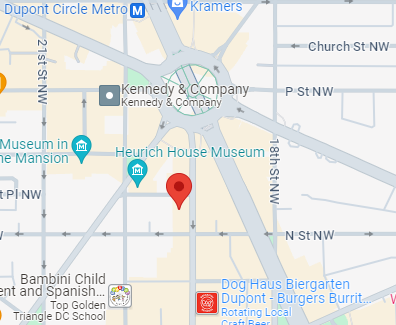
|
eSpherical (Thailand) Co., Ltd. 1 South Sathorn Road, Lumpini Building 27th Floor Bangkok, Thailand 10120 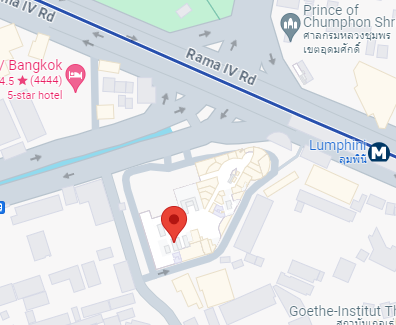
|
eSpherical.com software platform includes a comprehensive, secure, industry-leading mobile banking portal for Bangkok Bank. Our mobile portal the highest level of security available in the mobile industry as well as the most advanced mobile banking portal features available. Specifically, our platform includes a collection of AI tools for managing customer identity, advanced threat detection, and analytical dawshboards for greater business insight.
Our portal framework consists of a web front-end client wprocessor hich allows mobnile access to any device and which provides easier access for customers and easier customization for Bangkok Bank.
Accordingly, we provide a secure web-based mobile portal based on the Microsoft® .NET platform for Bangkok Bank hosted within the Bangkok Bank existing secure data center. The advantages of our proposed mobile portal platform configuration include the following:
- Advanced mobile technology; industry’s best in class.
- Rapid and cost effective development and mobile deployment.
- Available to all mobile devices.
- Integrated Arcot® RiskForte™ digital authentication security software.
- Integrated backend mobile data triple DES data encryption.
- Simple and convenient for Bangkok Bank customers.
- Integrated SMS/MMS notifications to customers and Bangkok Bank administrators.
- Multiple language support (Thai, English, others as requested).
- Fast and interactive mobile portal updates for Bangkok Bank administrators.
- Scaleable robust platform for future growth and enhancements.
- Support from global software leader, Microsoft®, and industry leaders eSpherical.com and Arcot®.
- Secure and integrated Identity Access Management (IAM) processes and algorithms for threat vector deterrence, authorized user management and access, and system audit requirements.
The Bangkok Bank mobile portal will be designed to enhance existing Bualuang iBanking features and functions to provide Bangkok Bank customers with seamless and efficient banking access via the mobile channel. A proposed top-level feature layout is shown in figure #1 below. Blue colored items are mobile portal pages, other colors represent backend security checks, processes or optional features.
Using the .NET mobile platform for Bangkok Bank Mobile, custom content will be delivered to each customer based on the customer device mobile profile. This allows for a more rich experience for customers with Windows® Mobile, SmartPhone, BlackBerry®, iPhone® and other PDA-based devices while also delivering complete content to customers with more standard-featured mobile devices. This dynamic content delivery is automatically processed via our .NET mobile software suite. This also allows for the seamless integration of new mobile devices that will become available to Bangkok Bank customers in the future. A sample mobile portal view for Bangkok Bank is shown in figure #2.
The Bangkok Bank mobile home page will include key information links which are helpful for all customers as well as potential customers. These links will be integrated with Bangkok Bank’s existing online portal and include the following:
- Bangkok Bank rates and Forex.
- Bangkok Bank products and services.
- Bangkok Bank ATM and branch location finder.
- Bangkok Bank key contacts (direct dial from mobile portal).
- About Bangkok Bank mobile portal.
The eSpherical.com mobile portal software will allow Bangkok Bank authorized IT staff to easily update the information on the home page links as needed and as products and services and locations are added and modified. This allows for efficient content and information management at the Bank level.
The mobile Account Access page is integrated with Bangkok Bank existing iBanking information and includes links to authorized customers' existing account information including the following:
- View balances (savings, current, fixed-deposit, loan, and credit card).
- View recent transactions. Track the movements of current, savings, and fixed-deposit accounts.
- View credit card statements and transactions over the last three months.
- View the repayment history of loan accounts to see remaining principal repaid transactions for the last twelve months.
The mobile Pay Bills page is integrated with Bangkok Bank existing iBanking information and includes the complete list of Bangkok Bank payees. Authorized customers can perform the following functions with the mobile Pay Bills page:
- View a list of payees (including credit cards) and make payments.
- Schedule payment dates for recurring bills.
- View payment history for individual payees.
The mobile Funds Transfer page is integrated with Bangkok Bank existing iBanking information and includes a list of approved beneficiaries (Bangkok Bank and other local banks) as well International Banks (SWIFT codes, account information, etc.). Authorized customers can perform the following functions with the mobile Funds Transfer page:
- Transfer funds between your Bangkok Bank accounts.
- Transfer funds from your account to someone else’s Bangkok Bank account.
- Transfer funds to accounts at other banks.
- Instantly add 3rd parties accounts.
- Send an SMS message to notify funds transfer recipients.
- International Funds Transfer(*).
- Transfer of expenses for education overseas.
- Transfer of expats' savings working in Thailand.
- Transfer of money to relatives or family with permanent residency in another country.
The mobile Mutual Funds page is integrated with Bangkok Bank existing iBanking information and allows authorized customers to invest in mutual funds by performing the following functions with the mobile Mutual Funds page:
- Purchase, redeem or switch orders for mutual funds units.
- Check the status of account holder mutual funds units.
The mobile Cheque Services page is integrated with Bangkok Bank existing iBanking information and allows authorized customers to perform the following:
- Suspend your cheque payments.
- View the list of cheques issued that have been returned over the last two months.
- View the list of cheques deposited into your accounts that have been returned over the past two months.
The mobile Promotions page allows authorized Bangkok Bank administrators to add and edit strategic bank promotions through an easy-to-use administrative web portal. The eSpherical.com mobile banking software can also integrate with Bangkok Banks existing online promotions, Whats New, and deliver these promotions to mobile customers. These promotions can be made available exclusively to the mobile channel if desired. Promotions can be tailored to specific customers, both registered logged in customers and general customers browsing the mobile portal. Promotions could include the following popular items:
- Rewards offered to preferred selected bank mobile customers.
- e-Voucher discounts for mobile-channel customers from preferred local vendors (dining, insurance, movies, airlines etc.)
- Privileges to preferred mobile customers.
- New offers specially targeted to mobile banking customers only (example: spe-cial flight promotions on Thai Airways or Nok air when using the Be 1st Credit Card).
The mobile My Settings page allows authorized customers to modify some of their information including contact and email details as well as set their SMS notification preferences. SMS notifications can be set for bill due dates, account balance warnings, transfer status, and other items. The My Settings page also provides help menus for customers to get additional help about each of the specific mobile features.
The following chapters of this proposal include technical details about the eSpherical.com mobile banking software as well as our proposed system architecture, security, and ongoing support and enhancement services.
The following chapters of this proposal include technical details about the eSpherical.com mobile banking software as well as our proposed system architecture, security, and ongoing support and enhancement services.
eSpherical.com is proposing a leading-edge secure and comprehensive mobile banking portal and software suite for Bangkok Bank. Our proposed model includes key processes and design details to ensure a successful mobile banking portal for Bangkok Bank. Key details include the following:
- Deployment of an advanced secure .NET customizable web front end mobile portal.
- Integration with Arcot Corporation RiskForte™ digital authentication software.
- Integration with VeriSign® 128-bit SSL digital server certificates.
- Integration with Microsoft® Windows servers and SQL Server® mobile databases.
- Deployment of triple DES data encryption in SQL Server® for selected mobile data.
- System Independent Verification and Validation (IVV) audit by 3rd party security firm (Disys Corporation) prior to deployment.
The following sections of this proposal provide technical details about our proposed mobile banking portal for Bangkok Bank.
The mobile banking module can be thought of in terms of three primary Functional Areas where the software performs a series of Functional Processes based on a given set of business rules. The functional areas include:
- Customer Area (mobile devices; internet; WAP connections).
- Service Broker Area (mobile transaction processor; Bangkok Bank).
- Financial Institution Area (Bangkok Bank server).
There are five primary Functional Processes which the mobile banking module performs. These functional processes include:
- Customer Login Process.
- Customer Validation & Authentication Process.
- Presentation of Transaction to Customer.
- Transaction Processing.
- Transaction Acceptance & Completion.
Each functional area is integrated through a series of secure connections to permit a secure login and transaction process. Figure #14 below is a general diagram of these functional areas. Detailed explanations are included in the following sections.
In reference to Figure #14 , the Functional Areas and Processes for the mobile banking software are described in accordance with the corresponding numbers in the figure.
1 This functional area represents the Customer Area or the main entry point for mobile users. The customer functional area refers to any mobile connection and/or wireless device connecting via the Internet or from a WAP gateway. These mobile users are connecting to the Bangkok Bank mobile transaction server and preparing to login. The mobile banking transaction server detects each connected mobile device and then delivers the most appropriate configuration (html, xhtml, WAP, etc.) for the device. There can be unlimited mobile users on the transaction server; in the event processor resources are completely consumed by overwhelming numbers of users, users are managed with load-balancing software.2 This functional area represents the Service Broker or mobile transaction server. The Ser-vice Broker performs a critical role as the primary transaction processor/server as well as the primary security interface protecting and shielding the connected financial institution from potential security threats. Specifically, the service broker manages the following security parameters:
- Customer-to-broker connection security and transaction validation.
- Mobile device detection and mobile page delivery.
- Session variables management and security.
- Broker-to-bank secure communication (https and XML) via shared key and/or session variables.
- Transaction data package verification and presentation to Security Stack.
When a transaction data package is ready to be sent to the bank for processing, the Service Broker model establishes one threaded connection via the Service Broker to the Bank by way of a multi-level security stack and shared keys & variables. This server-to-server transaction communication is more secure, more efficient, more reliable, and more flexible and scalable than a direct customer connection to the bank server. For example, instead of multiple clients accessing the bank’s servers, there is only one connection and one trusted Bank server access via the Service Broker.
3 This transaction component represents two primary processes. The first process is the establishment of shared session variables on the customer (mobile phone or device) and the Service Broker. These session variables can only be set and read by the mobile transaction server which ensures that the transaction has originated and is taking place on the bank transaction server. For high-level security, in the event a client loses or does not possess a transaction server session variable, processing for that client is stopped and the client is forced back to the start pages. This prevents unauthorized access to the payment module on the transaction server.
The second process is the forced https (SSL) customer-to-broker connection. The transaction server examines every connection and every https/XML request to ensure all requests occur over SSL; in the event an https Connection is lost or a user tries to connect without https, the client is forced back to port 443 (SSL) before any further processing or code execution can occur. Forced https (128 bit) data and transaction encryption ensures high-level security and transaction integrity on the transaction server.
4 This transaction component represents the processes whereby the transaction server and the financial institution bank server establish one of the following security exchanges:
- An encrypted shared key between the Service Broker transaction server and the financial institution server, or;
- An encrypted shared session variable which is passed between the Service Broker transaction server and the financial institution server for each transaction.
5This transaction component represents the processes whereby the transaction server creates a transaction data package for presentation to the financial institution. This data package includes various security parameters (shared server keys/variables, session parameters, device parameters, etc. ) as well as the actual transaction data (account view, funds transfer, etc.). This transaction data package is passed via secure XML over port 443 to the receiving financial institution server. The next step in the process of transaction data package transfer is arrival of the package at the Security Stack external to the Bank backend server firewall. The package is now examined according to the Security Stack rules discussed in the next section.
Again, the advantage of having a single server-to-server connection as designed in our Service Broker configuration is that the financial institution only has to manage one trusted customer, the Service Broker, as compared to other vendors which require the financial institution to manage ALL connected customers.
6This functional area represents the interface between the Service Broker and the Financial Institution (Bangkok Bank). In Figure #14, this is referred to as the Security Stack. eSpherical.com has created an extremely strong 4-layer security stack. This security stack serves as a tactical barricade preventing entry to the Bank firewall until all four security layer conditions are met. The conditions which must be met include the following:
- Layer 1: Has the transaction data package arrived encrypted via SSL on port 443?
- Yes: Continue to Layer 2
- No: Abort all processing. Generate exception handler, grab device IP address and device details for handler file. Send out exception handler to system administrators.
- Layer 2: Does the detected IP address for the transaction data package exactly match the predefined Service Broker IP address?
- Yes: Continue to Layer 3
- No: Abort all processing. Attempt to set a blocking (Trash Can) variable/cookie on the referring device; set the Trash Can expiration for 365 Days. Generate exception handler, grab referring IP address and all device details for handler file. Send out exception handler to system administrators immediately. Send out SMS to system administrators mobile phones immediately. Send out message to Data Center to add referring IP address to disallowed IP addresses in Windows Console Manager. Review system access before removing IP address from disallowed IP table.
- Layer 3: Does the transaction data package contain a client session variable from the Service Broker server?
- Yes: Continue to Layer 4
- No: Abort all processing. Generate exception handler, grab device IP address and device details for handler file. Send out exception handler to system administrators.
- Layer 4: Does the transaction data package contain a Shared Server Key or Server Session Variable and if so, does this variable/key match the predefined values?
- Yes: Pass the transaction to the Bank Firewall for hand-off to Bank. Include results for each of the layers above in the Data Package.
- No: Abort all processing. Attempt to set a blocking (Trash Can) variable/cookie on the referring device; set the Trash Can expiration for 365 Days. Generate exception handler, grab referring IP address and all device details for handler file. Send out exception handler to system administrators immediately. Send out SMS to system administrators mobile phones immedi-ately. Send out message to Data Center to add referring IP address to disallowed IP addresses in Windows Console Manager. Review system access before removing IP address from disallowed IP table.
- Accept the transaction data package and process it according to Bank rules; return the predefined results to the Service Broker.
- Reject the transaction data package and send message to the Service Broker that the data package was rejected; Bank will supply a predefined set of error/rejection messages for debugging purposes.
- Accept or Reject the transaction data package from the Service Broker.
- Validate/Authenticate the user in the data package (user ID, Password, IC/Passport, etc.).
- Pass back User Authentication Package to Service Broker:
- User Authenticated: No. Abort. Allow user 2 more sign in attempts.
- User Authenticated: Yes. Include the following in Authentication package:
- User Authentication Key (1=yes, 0=no).
- User First Name and Last name.
- User Account Types.
- Bank transaction number; Bank Date/Time.
Figure #15 is a diagram of the standard technical processes required for mobile transactions. Each of these steps is described in detail in the following sections.
The first step of the mobile transaction process involves the customer login. Customer login occurs on the transaction server via a login page formatted for the connected mobile device. The login process includes a series of security filters and security checks; these checks and filters are designed to ensure the integrity of the connected device and to validate the origin of the login process. Specifically, the following parameters are validated on the connected customer and validated with the transaction server credentials:
- Customer Origin: the referring page from which the customer has requested the login. This security check ensures that the login request is from the Bangkok Bank transaction server. No other origin is allowed; the login is terminated if the customer origin not via the transaction server page. This prevents page hijacking or spoofing.
- Customer Session Variable: the transaction server checks the connected customer for a session variable from the transaction server. If this session variable is not present, the login is terminated. This session variable check prevents page hijacking or spoofing.
A If the above three security filters and checks are successfully validated, the connected customer (mobile device) is presented with the Bank login page. The login page is pre-sented only over an SSL connection. In the event an SSL connection is not made, the client is automatically redirected to port 443 for a secure connection. The customer is also presented with a Locked Icon with the words Secure if the connection is secure. If the connection is NOT secure, the Lock Icon is open and the warning Not Secure — Stop is shown to the customer and the login button is disabled. This lock is also bound to the transaction server IP. If a secure connection cannot be established, the login process is terminated.
If all the security filters and checks for Step 1 are met, the customer login page is sent via an encrypted https Post method to the Bank security stack.
The second step of the mobile transaction process involves three primary phases.
- Phase 1: transaction verification (security stack interface).
- Phase 2: customer validation and authentication (Bank server) via Arcot® Risk-Forte™ authentication software.
- Phase 3: customer authentication pass back to the transaction server
Phase 1 starts at the Security Stack Bank interface. The Security Stack includes the following layers and functions which serve as security filters and checks before any transaction is allowed to pass through the Bank firewall.
- Port 443 Filtering: the first security stack layer includes a filter for checking to en-sure that the transaction from Step 1 has been directed to port 443 (SSL) at the Bank interface. This filter is shown in Figure #15 as the green server port. If the login transaction is NOT presented to port 443, the login is terminated and sent back to the transaction server.
- IP Lock: the second security stack layer includes a filter to check the IP address of the referring server for the login page. The IP Lock layer will only accept requests from the transaction server IP. Any other IP addresses are blocked and transaction processing stopped.
- Session Lock: the third security stack layer includes a filter to check for the existence of a transaction server session variable. This session variable is required for the transaction and can only be set by the transaction server. If a transaction session variable is not present, the transaction processing is stopped.
- Server Lock: the fourth security stack layer includes a server shared key or predefined session variable. This shared key/session variable can only be set and read by the trans-action server and bank server. If a shared key/session variable is not present, transaction processing is stopped.
- Bank Firewall: the final security stack layer consists of the Bank Firewall. The Bank firewall is controlled and managed by the Bank in accordance with their rules and procedures.
In order for a login to be presented to the Bank for validation and authentication, each of the above security layers must be successfully passed in accordance with predefined rules. These predefined rules are established in a written Service Agreement between the Bank and the technology vendor (eSpherical.com). If the transaction fails to successfully pass any of the above security layers, transaction processing is stopped and the transaction event is logged in a failed transactions table in the mobile transaction server database.
Phase 2 takes place on the Bank server and includes customer login validation and authentication. Phase 2 is a Bank process and occurs in accordance with Bank rules and regulations. The service broker is not directly involved in the Bank customer validation and authentication process except to ensure that all security layers are successfully passed at the security stack before a customer is presented to the Bank for validation and authentication.
At this phase of customer authentication, the mobile banking software invokes the Arcot® RiskForte™ authentication software according to the figure #16.
The RiskForte™ process is designed to create a real-time risk assessment profile and then determine the action allowed based on Bangkok Bank’s predefined business rules. Specifically, every transaction generates a risk score which is then evaluated against the bank business rules and the appropriate action is then processed (Approve transaction, Decline transaction, Alert Customer Service Representative-CSR and provide additional authentication). A summarized explanation of the process is provided as follows:
- Customer location ID, device ID (mobile IMEI number) and user ID is evaluated based on user login history and device identification.
- User transaction type and details are compared with historical transaction data for this user (Risk Model) and evaluated with the parameters collected in (1) above. A Risk Assessment score is generated for this user and this transaction.
- The risk score is compared with Bangkok Bank business rules (policies and user details) and a decision is generated based on the risk score and business rules.
- The decision generated in (3) authenticates the user transaction in one of three decision matrices:
- Approve the transaction based on the risk score and business rules
- Alert the customer service representative (CSR) and require additional authentication information from the user (security questions, etc.)
- Decline the transaction based on the risk score and business rules and create an audit trail.
The above RiskForte™ process is seamless and transparent to the customer and occurs in real-time during the transaction processes.
Phase 3 involves the Bank-to-Transaction Server pass-back for the following security parameters:
- Authentication status.
- Customer login status.
- Transaction status.
This process includes an XML SOAP data package (Web Service) post to the transaction server. The SOAP data package contents are based on the authentication status (authenticated or not-authenticated) for the customer login. Examples of standard SOAP data package elements and structure are included in Figure #17 below. An explanation of each data element is included in Table #1 below Figure #17.
For the above authenticated user SOAP data package, each of the data elements are described in further detail as follows:
In the event a customer is not authenticated, the Bank will return the following SOAP data package (figure #18) to the transaction server.
The SOAP package detailed in figure #18 includes the Authentication Status value of 0, which means that the customer login was unsuccessful. Based on predefined business rules, the non-authenticated customer may be allowed several more attempts to login. If this is the case, the transaction server will allow the customer to reenter their user ID and password. It is the policy of eSpherical.com to allow no more than three (3) consecutive login attempts by a customer. After the third unsuccessful login attempt, the customer is prevented from any further login. This process can be modified based on the Bank requirements. This policy is further described in the section titled Software Operational Written Agreements.
The third step in the mobile transaction process involves XML processing of the SOAP data package passed to the transaction server from the Bank as detailed in Step 2. There are several initial security filters which are performed when the SOAP data package is received from the bank by a connected mobile customer.
B The first security filter involves testing the SOAP data package origination to ensure that it was passed from the Bank server IP address. If the origination IP does not match the Bank IP, transaction processing is stopped. If the origination IP is verified and matches the Bank IP, the SOAP data package is opened (parsed) by the transaction server starting with the SOAP Header as detailed below.
SOAP-Env Header:
The second security filter includes examining the SOAP Envelope Header information. If the Authentication Status element is 0, the transaction server redirects the connected mobile customer back to the login page and Step 1 starts again. The connected mobile customer is provided a message that the login failed. Three login retry attempts are allowed. After three failed attempts, the connected mobile customer is no longer allowed further login attempts. Processing is stopped for the connected device.
If the Authentication Status element is 1, each of the header element values are checked and verified. If verification passes for each of the header elements and the Customer Session in the SOAP header matches the session binding of the connected mobile customer, the processing is allowed to proceed as detailed in the following section.
SOAP-Env Body:
Once the SOAP header has been verified, the transaction server examines the data package elements in the SOAP-Env Body to ensure that all required elements are present. If any required elements are missing, the transaction server creates an error log and presents the Bank IT administrators with the resulting error message. Processing is stopped upon error logging. If the examined SOAP-Env Body contains all the required elements, the connected mobile customer is directed to Step 4 for presentation of the transaction.
Step 4 of the wireless payment process includes displaying the parsed SOAP XML data to the connected mobile user’s device. This presentation is accomplished by the transaction server .NET compact framework software which determines the best language (WML, xHTML, HTML, etc.) to deliver to the device.
C D The presentation to the connected mobile customer includes several security filter checks. The first security filter ensures that the presentation page has originated from the transaction server IP address. The second security filter includes verifying that the connected mobile device and the SOAP data package session variables match. If both security filters are successfully passed, the transaction server begins processing the display to the connected mobile customer.
The transaction presentation includes the following elements from the SOAP envelope in addition to several transaction server elements:
- Secure connection indicator. Locked if secure, unlocked if not secure. If not secure, the Confirm button is disabled and transaction processing is stopped.
- Bank Logo and Bank specific notices, if any.
- From Account select list
- Transaction Number
- Transaction Amount (if any)
- Effective Date
Once the customer has reviewed the transaction details and clicked the Confirm button, the transaction is returned to the Bank for processing in Step 5.
E The fifth step of the mobile transaction process involves processing the transaction by the Bank. The process requires several phases to complete. The first phase is the pass back of the SOAP data package from the transaction server in Step 4. The passed back SOAP data package goes through the same security filters and validation process as Step 2 with the exception that the connected mobile customer has already been authenticated. In particular, the SOAP data package is sent from the transaction server to the Security Stack at the bank and evaluated according to the following filters:
- Port 443 Filtering: the first security stack layer includes a filter for checking to ensure that the transaction from Step 4 has been directed to port 443 (SSL) at the Bank interface. This filter is shown in Figure #14 as the green server port. If the login transaction is NOT presented to port 443, the login is terminated and sent back to the transaction server.
- IP Lock: the second security stack layer includes a filter to check the IP address of the referring server for the login page. The IP Lock layer will only accept requests from the transaction server IP. Any other IP addresses are blocked and transaction processing stopped.
- Session Lock: the third security stack layer includes a filter to check for the existence of a transaction server session variable. This session variable is required for the transaction and can only be set by the transaction server. If a transaction session variable is not present, the transaction processing is stopped.
- Server Lock: the fourth security stack layer includes a server shared key or predefined session variable. This shared key/session variable can only be set and read by the transaction server and bank server. If a shared key/session variable is not present, transaction processing is stopped.
- Bank Firewall: the final security stack layer consists of the Bank Firewall. The Bank firewall is controlled and managed by the Bank in accordance with their rules and procedures.
If the SOAP data package fails any one of the above security filters, the transaction is stopped and logged in the transaction server error log tables. If all of the above filters are successfully passed, the SOAP data package is presented to the Bank for processing.
Bank processing involves examining the contents of the SOAP data package Header and Body contents. The SOAP Envelope looks exactly the same as the SOAP Envelope from the Bank in Step 2 except that the AccountType and AccountNumber data elements have one and only one discrete data value respectively. This data value represents the Pay From account selected by the connected mobile customer.
Once the Bank has parsed and validated the SOAP data package and its contents, the bank is ready to perform its internal payment processing, in the case of a Bill Pay function for example. Generally, payment processing at the Bank level includes the following primary steps:
- The Bank debits the connected mobile customer’s account
- The Bank credits the Client’s (Payee) account
- The Bank provides a payment status indicator and a reference number
At the completion of the Bank payment transaction process, the Bank sends the SOAP data package back to the transaction server for presentation to the connected mobile customer. The SOAP data package is processed through the same security filters as in Step 2. The SOAP data package from the bank is identical to the SOAP data package received from the transaction server in Step 4 with the exception that the PaymentStatus and BankReference data elements within the SOAP envelope body have discrete values from the Bank Payment Process. Once the SOAP data package has been sent to the transaction server, from the Bank perspective the wireless payment process is complete.
F Step 6 of the wireless payment process includes the Transaction Completion and is the final step of the transaction process. This process includes presentation of the transaction details to the connected mobile customer. The SOAP data package is passed from the Bank to the transaction server. The SOAP data package is processed according to the same security filters as in Step 4. If the SOAP data package fails any of the security filters, the transaction is stopped and logged in the transaction server error log table. If the SOAP data package passes all the security filters, the transaction details are presented to the connected mobile customer.
Upon presentation of the transaction completion screen to the connected mobile customer, the mobile transaction payment process is complete in terms of the transaction server and the Bank. Session variables between the transaction server and the bank are deleted.
The eSpherical.com mobile banking software is written in Microsoft® .NET and runs on Windows™ Small Business web servers. The enterprise database is Microsoft® SQL Server 2005 and the server digital certificate is a 128-bit VeriSign® server certificate. Figure #19 shows the generalized architecture for our mobile transaction system.
In Figure #19, the existing mobile transaction system architecture consists of four primary application servers, each with a particular function. Exernal to the system archecture are connected mobile devices, displayed in the diagram for reference. For the purposes of this technical proposal, the primary consideration involves the Transaction Server to Bank Processing Server interface connection. For reference, the four server components and connected mobile devices are detailed below:
Bangkok Bank Transaction Server: This server manages all mobile device connections and also communicates with the Bangkok Bank corporate server. The eSpherical.com transaction server also is connected to an SQL server database for managing mobile transactions. The transaction server and SQL database are protected by firewalls and managed port scanning and monitoring. The transaction server includes a 128-bit VeriSign® server certificate for SSL connections.
Bangkok Bank Mobile Development Server: This server includes a development platform for the mobile banking software. Keeping the development environment inside the bank ensures a more comprehensive security matrix. The development server is protected by a firewall, IP restriction rules, and VPN connections.
Bangkok Bank Corporate Server: This server contains Bangkok Bank customer information. Interaction with this server is via only trusted transaction server connections. The bank corporate server is protected by firewalls and other bank specific security parameters.
Disaster Recovery Server: eSpherical.com proposes a mobile disaster recovery server for Bangkok Bank to ensure continuity of operations in the event of a production server failure. The disaster recovery server should be continuously updated with current data.
SQL Database Server: The SQL Server database resides on a separate database server for security and performance. The SQL Server is protected by firewalls and other security restrictions.
Connected Mobile Devices: This is not a server environment but rather a framework where mobile customers connect to the bank transaction server. The transaction server manages these connections through shared session bindings and delivers content to the connected devices as well as device processing transactions and generating risk scores according to the RiskForte™ authentication software. Connected mobile devices are managed via session variables and SSL 128-bit secure connections.
For security and auditing purposes, eSpherical.com recommends that all mobile banking software and hardware should be located and hosted at the Bangkok Bank existing data center unless there is a compelling reason to locate the mobile banking software elsewhere. Keeping the mobile banking software together with the Bangkok Bank iBanking software at the existing data center will ensure compliance with existing Bangkok Bank security policies and procedures.
Additionally, to prevent potential breaches of security, eSpherical.com recommends that all development efforts for the Bangkok Bank mobile banking software should occur on-site at the Bangkok Bank existing iBanking data center.
eSpherical.com will include a series of written software agreements as part of our mobile banking solutions software. These agreements are between eSpherical.com, Microsoft® and Bangkok Bank. Written agreements cover the following areas in detail:
- Service level agreements for system performance.
- Data management agreements for disaster recovery and system backups.
- Security agreements.
- Confidentiality agreements.
- Nondisclosure agreements.
- Software warranty agreements.
- Support Agreements.
- Policies and Procedures.
- Staff Managemement and Chain-of-Command.
Since the mobile banking software interfaces with a financial institution (Bangkok Bank), eSpherical.com will work closely with Bangkok Bank and required national banking regulatory authorities to ensure that all audit requirements for the mobile banking portal are compliant with the Kingdom of Thailand laws and regulations. In particular, eSpherical.com has considerable experience in developing software for the U.S. Federal government. Our software and our company have been involved in extensive federal government Certification and Accreditation processes and e-Authentication processes in accordance with the U.S. Federal Information Security Management Act (FISMA). Our staff have undergone extensive background security checks in accordance with the US federal government SF 85 and HSPD-12 security clearance process.
For mobile banking software, software applications and transaction server(s) will be hosted in Thailand at Bangkok Bank. This will allow for efficient auditing of the mobile banking data center, physical hardware resources, and secrity policies.
Based on our knowledge of overall mobile banking requirements, eSpherical.com is prepared to begin work immediately upon authorization from Bangkok Bank. We anticipate an approximately 6 month start-to-finish process for Bangkok Bank. The schedule for deployment is dependent on how fast Bangkok Bank will proceed with testing and acceptance of the mobile banking software. eSpherical.com follow the Software Development Life Cycle (SDLC) schedule as detailed below:
SDLC Schedule
- Prepare/Review system requirements documentation from Bangkok Bank.
- Prepare/Review system design documentation based on requirements.
- Develop software application.
- Test software application: Bangkok Bank is required to sign-off on final software application.
- Independent software verification and validation (IVV) by 3rd party IT security business.
- Deploy software application to production server.
- Schedule a Soft Launch with selected users.
- Conduct Full Scale launch with all customers.
eSpherical.com provides local-based technical and development support for all of our software, including mobile banking software for Bangkok Bank. This local support is based in our Asia Pacific office in the LH Bank building (Lumpini) at 1 South Sathorn Road, Bangkok, Thailand. Detailed service level agreements (SLA) for technical support will be covered in our written agreement with Bangkok Bank.
In order to ensure a smooth and timely development and deployment process for the mobile banking software, eSpherical.com recommends the following levels of commitment from Bangkok Bank:
- Mobile banking software project team with a specified project manager to communicate directly with eSpherical.com.
- Mobile banking software technical team with a specified technical lead to communicate directly with eSpherical.com.
- Prompt software requirements review.
- Prompt software design review.
- Mobile banking software testing team with specified project team lead to communicate directly with eSpherical.com.
- Weekly in-person status meetings once development has started (weekly agenda and attendance by project management team).
eSpherical.com has an existing working relationship with Microsoft. For the development and deployment of the mobile banking software for Bangkok Bank, eSpherical.com will expect the following level of commitment from Microsoft:
- Dedicated Project Lead to work directly with eSpherical.com.
- Dedicated IT team to review software development.
- Dedicated IT team to conduct user testing.
- Weekly in-person status meetings once development has started (weekly agenda and attendance by project management team).
- Monthly Internal Program Review (IPR) on software development progress and customer relationship management with Bangkok Bank. This monthly IPR will be between Microsoft® and eSpherical.com.
THIS SECTION HAS BEEN REDACTED
1This proposal cannot be sold, given, copied, assigned, shared, and/or transferred in any manner to any other entity other than Bangkok Bank and/or Microsoft without first obtaining permission in writing from eSpherical.com.
eSpherical.com is very pleased to have the opportunity to offer our high technology mobile software solutions to Bangkok Bank. We can assure you that we will deliver to Bangkok Bank the highest quality software and professional services available. We look forward to a close and beneficial relationship between our companies.
As the founder and CEO of eSpherical.com, I will serve as the key management and technical executive for this solution from start to finish as well as post deployment.
—Keith Stewart